
Summary
- An Expert Advisor (EA) is an automated trading program that runs on MetaTrader 4 (MQL4) or MetaTrader 5 (MQL5).
- Best AU brokers for EA trading: IC Markets, Pepperstone, FP Markets. All three offer RAW/Razor pricing and MT4/MT5.
- Free VPS programs: IC Markets offers a free Equinix-hosted VPS at 15 or more standard lots per month. Pepperstone sponsors VPS for Pro clients at qualifying 60-day volume.
- Common EA strategies include scalping, grid, martingale, breakout, and trend-following. Grid and martingale carry serious blow-up risk.
- ASIC angle: an EA you build and run on your own account is fine. Selling EAs commercially or operating an EA-driven managed account for AU retail clients almost certainly requires an AFSL.
What is an Expert Advisor?
An Expert Advisor (EA) is a piece of software that runs inside a MetaTrader platform and executes trades according to programmed rules. It can open positions, set stop-losses and take-profits, manage trailing stops, close positions, and run any strategy that can be described in code. Once attached to a chart, the EA runs continuously without any further input, so you can set it and let it trade 24/5.
The platform context matters because EAs run only on MetaTrader, so you need a broker that offers MT4 or MT5. They are not available on cTrader (which uses cBots written in C# instead), TradingView (which supports alerts but not direct broker order routing on the AU entity at most brokers), or proprietary platforms like CMC’s Next Generation, IG’s web platform or Plus500.
The terms ‘expert advisor’ and ‘trading bot’ are often used interchangeably, and I’d call that fair. The retail forex industry settled on ‘EA’ for an automated MetaTrader strategy. ‘Bot’ is broader, covering EAs, cBots and any other automated trader.
MQL4 versus MQL5
EAs are written in MQL (MetaQuotes Language), so the language you code in depends on which platform the broker supports. MQL4 was built for MetaTrader 4 and is the older, simpler dialect; MQL5 was built for MetaTrader 5 and is closer to a proper object-oriented programming language with C++ heritage. I’d want a broker offering both, to keep your options open.
| Feature | MQL4 | MQL5 |
|---|---|---|
| Platform | MetaTrader 4 | MetaTrader 5 |
| Hedging | Native (one ticket per trade) | Optional (netting or hedging mode) |
| Order types | Limited set | Expanded set |
| Backtesting | Single-currency, single-thread | Multi-currency, multi-thread |
| Marketplace | mql5.com (legacy listings) | mql5.com (active) |
| Code conversion | Manual rewrite required | n/a |
For most retail strategies, MQL4 is still the more common choice. MT4 has a larger installed base and most pre-built EAs on the MQL5 marketplace are still MT4-targeted. MQL5 wins on backtesting capability and is the better choice for new EA development. I’d build any new EA in MQL5 today and deploy on MT5.
Of the 32 ASIC-regulated brokers we cover, seventeen offer both MT4 and MT5, including Pepperstone, IC Markets, FP Markets, Eightcap, Fusion Markets and Vantage. I’d want a broker that offers both, so I’m not locked into one language. CMC retired MT5 for AU clients in 2022, so that’s one less option for anyone who values platform parity. FXCM’s Australian entity runs MT4 but no MT5, so an EA there is written in MQL4.
Broker requirements for running EAs
From a broker, an EA needs four things: MetaTrader on the Australian entity, RAW or Razor pricing so spread does not eat the edge, execution fast enough for the strategy’s timeframe, and a VPS the EA can run on around the clock. That first requirement rules out Interactive Brokers, which offers neither MT4 nor MT5, so MetaTrader expert advisors cannot run there. In our tracking, only three brokers tick all four boxes comfortably. I’d add a fifth requirement: a broker that doesn’t mess with execution during news.
IC Markets
IC Markets (AFSL 335692) runs MT4 and MT5 servers in Equinix NY4 (New York) and LD5 (London). Its Raw Spread account averages 0.0 to 0.2 pips on EUR/USD plus an AUD 9 round-turn commission per standard lot. A free VPS is available by trading 15 or more standard lots of forex or metals per calendar month, and there’s no balance test. For active traders, that free VPS threshold is reachable if you trade actively.
IC Markets shows up in nearly every list of best brokers for EAs that this site publishes. I put that down to the blend of raw pricing, MT4 and MT5 servers in NY4 and LD5, and the free VPS offer.
Pepperstone
Pepperstone (AFSL 414530) offers MT4, MT5, cTrader and TradingView. The Razor account prices similarly to IC Markets Raw, quoting around 0.0 to 0.3 pips on EUR/USD plus an AUD 7 round-turn commission. Server locations include Equinix LD5 (London) and NY4. I’d pick Pepperstone if I wanted cTrader alongside MetaTrader.
For traders with enough volume, Pepperstone’s Active Trader programme rewards with rebates and a free NY4 VPS, which means you can run an EA on a free server once the threshold is cleared. Qualification is by monthly traded volume, not a required balance. Pepperstone also packs in its Smart Trader Tools, a free MT4/MT5 add-on with around 28 indicators and order management tools that retail EA developers find handy.
FP Markets
FP Markets (AFSL 286354) runs MT4, MT5 and cTrader on Equinix NY4 servers. The Raw account averages 0.0 to 0.2 pips on EUR/USD plus an AUD 7 round-turn commission per standard lot, so your round-turn cost is the lowest among the top three AU EA brokers, matching Pepperstone (IC Markets charges AUD 9). I’d consider FP Markets for the cTrader option.
FP Markets provides a paid VPS (around USD 30/month, sometimes waived at higher volume). For retail EA traders, the execution stack is competitive with IC Markets and Pepperstone, and the slightly lower commission can matter for high-frequency strategies. The need to pay for a VPS unless you hit the waiver threshold is a minor friction compared to the commission saving.
Honourable mentions
Three others worth a look: Eightcap, Fusion Markets and Global Prime all offer MT4/MT5 with competitive RAW pricing. Fusion Markets charges AUD 4.50 round-turn, joint second-lowest with Axi among the brokers we cover and behind ACY Securities at AUD 3.00, but it’s a smaller broker and the VPS programme isn’t as deep. I’d want to see a stronger VPS offering before committing to Fusion Markets. Eightcap suits traders who want crypto CFDs alongside forex EAs. Fusion Markets and Global Prime operate under the same licensee, FMGP Trading Group Pty Ltd (AFSL 385620). Our lowest commission forex brokers guide compares the full commission field. For the broader shortlist, see our top forex brokers in Australia rankings.
Commission is the line item EA traders most often get wrong, because it is charged per round turn rather than buried in the spread. Our broker cost calculator adds spread and commission together at a trader’s own monthly lot volume, so the real cost is visible before you fund an account. David Levy checks the published commissions to make sure they’re accurate. MetaTrader isn’t the only route, either: cTrader’s cBots, copy trading and the broader algorithmic stack are covered on our best automated trading platforms in Australia page.
Free VPS offers for AU traders
A Virtual Private Server (VPS) hosts an EA in a data centre with low latency to the broker’s servers. Run it on a home PC instead, and every power flicker, internet drop, or Windows restart kills the EA, which means you could wake up to an open position with no stop-loss.
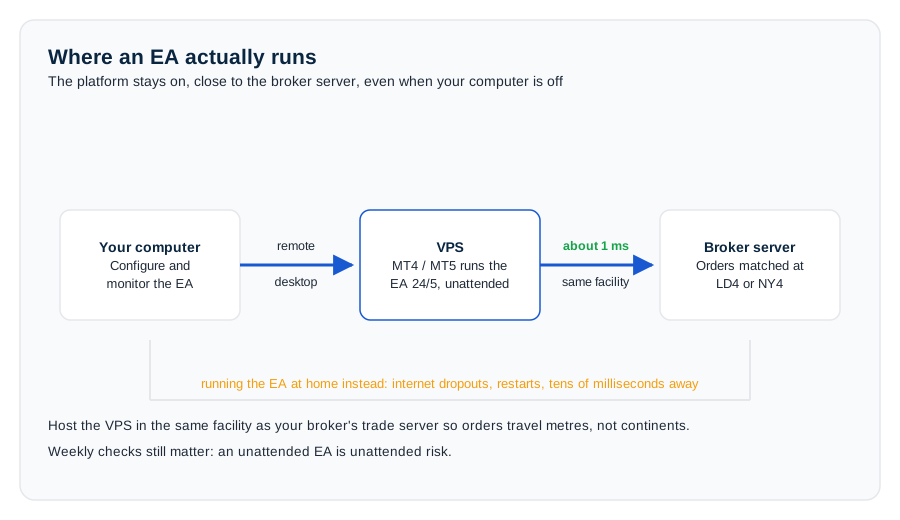
The diagram on this page traces the execution path clearly. A home connection adds both latency and outage risk; a VPS in the same data centre as the broker removes most of them, which is why a VPS is non-negotiable for a live EA.
Most professional EA traders run on a VPS. Free VPS programmes from AU brokers:
| Broker | Free VPS criteria | Hosting location |
|---|---|---|
| IC Markets | 15 standard lots/month (forex and metals), no balance test | Equinix NY4 |
| Pepperstone (Pro clients) | USD 1 million+ notional per 60 days (about 10 standard FX lots) | Equinix NY4 |
| FP Markets | Paid VPS (about USD 30/month), sometimes waived at higher volume | Cross-connect via Equinix |
Not everyone meets the free VPS threshold. Paid options from BeeksFX, ForexVPS, NYC Servers, and TradingFX VPS run AUD 30 to 60 per month for a basic Windows VPS with cross-connect to LD4 or NY4 (where most AU brokers’ MT4/MT5 servers actually live), so you can still get the latency benefit without the volume requirement.
The latency benefit is real. A home connection from Melbourne to NY4 typically sees 200ms or more round-trip. A VPS in NY4 gets under 5ms. For scalping EAs that depend on speed of entry, those milliseconds are the strategy, so you can’t afford to run a scalper from a home connection.
Common EA strategies (and the risks)
Most EAs sold or shared online fall into one of five strategy buckets. There are profitable EAs in every bucket. There are also spectacular blow-up failures in every bucket. I’d learn to identify the bucket before buying anything.
Trend-following. The EA opens trades in the direction of a moving average crossover, breakout, or momentum signal. Risk per trade is fixed and drawdown stays manageable. It’s the bread-and-butter strategy quants and retail systems both use. For you, this is the safest starting point.
Scalping. The EA opens and closes trades within minutes, chasing tiny pips. Scalping EAs feed on tick data, micro-trends and news flickers. They’re profitable on tight RAW spreads but a nightmare on Standard accounts, so you need RAW pricing for a scalper.
Grid. The EA places layered orders above and below a starting price. It profits when price oscillates. When price trends through the grid, it loses catastrophically. Most grid EAs eventually blow up the account. I’d avoid any grid EA sold without a clear explanation of the blow-up risk.
Martingale. The EA doubles down on losing positions until price reverses. It wins mathematically on any single sequence; it loses the entire account on a long enough sequence. I’d avoid it unless the bet is fully understood.
News / event-driven. The EA places orders into known data releases like NFP, CPI and RBA decisions. Risk depends on slippage and how the broker handles news spikes. Some ASIC brokers tighten margin requirements around major data, so these strategies can be disrupted, and you’ll face slippage that can break the strategy.
Buy an EA on the MQL5 marketplace that claims a 90% win rate or turns AUD 1,000 into AUD 50,000 in three months, and the system is almost certainly a grid or martingale. The win rate is high because most positions close in profit; the losses, when they come, are total. I’d treat any EA with a 90% win rate as a warning label. We’ve yet to see a sustainable retail EA strategy that isn’t either tight risk-per-trade trend-following, fast scalping on RAW spreads, or quantitatively sophisticated mean-reversion.
Where to find EAs
Three main sources for retail traders.
MQL5 Marketplace. The official MetaQuotes marketplace with tens of thousands of EAs, free up to USD 1,000+. Focus on the live signal track record, not the backtest, and check the public reviews. Filter by EA age (12 months minimum) and by drawdown rather than annual return. A live track record of at least 12 months matters more than any backtest.
Forex forums and Discord communities. ForexFactory, BabyPips, Reddit r/Forex and Discord servers share free EAs, but quality is mixed. Most free EAs are educational examples or marketing for paid versions. Test on a demo account for at least 30 days before risking real money, because you’ll find mostly marketing, so treat free EAs as a starting point.
Custom development. Hire an MQL5 developer to code a strategy. Budget AUD 500 to AUD 5,000+ depending on complexity. This route works for a trader who has a defined edge to automate; it’s wasted money for one who doesn’t, so you need a proven edge before hiring a developer.
I’d have any new EA trader begin with the MetaTrader Strategy Tester on a free demo account. Build or buy a simple EA, backtest it across 5+ years of data, then forward-test on a demo for 30 to 60 days before deploying live. The platforms that ship with this tooling out of the box are MT4 and MT5 at IC Markets, Pepperstone or FP Markets.
ASIC and the AFSL question for EAs
This is where a lot of writers oversimplify. The honest position:
Running an EA on your own account is fine. ASIC has no restriction on retail traders using automated tools on their own accounts. Any EA can be used, built from scratch, or bought off the MQL5 marketplace. No licence needed.
Selling an EA to AU retail clients gets murky. When an EA is sold with a track record of trading recommendations, ASIC may treat it as a financial product or financial service. Selling automated trading systems to retail clients in Australia generally requires an Australian Financial Services Licence (AFSL) or authorised representative status. Case law going back to Provident Capital and similar matters supports a broad interpretation of ‘financial advice’ and ‘financial product’. Legal advice is required if you’re selling an EA.
Operating a managed account where an EA is traded on someone else’s funds for a fee almost certainly requires an AFSL. That’s providing a financial service. Don’t accept other people’s money to trade an EA without the right licensed structures: a managed discretionary account, an AFSL with the correct authorisations, AFCA membership and professional indemnity insurance. The full licence setup is needed if you’re managing other people’s money.
Thinking of monetising an EA? Talk to a lawyer who specialises in financial services regulation. The two firms most often cited are Sophie Grace and Hall and Wilcox. You’ll want a lawyer who knows the ASIC rulebook.
As a buyer, prefer EA sellers who don’t make trading recommendations or claims about returns. Educational tools, indicators, and backtested logic are easier to sell legally than ‘this EA will make you 30% per year’.
Where the six steps go wrong
The six-step safe-start checklist at the bottom of this page is easy to read, and just as easy to skip. But each step fails in a specific, predictable way, and knowing how it breaks makes the step worth doing. Skip a step and you’ll find out the hard way.
Each of the six steps breaks in a predictable way, and the pattern is what I would underline. The platform choice traps a trader later rather than sooner: an MT4 EA does not run on MT5, so buying the wrong version means buying twice. The account choice is where most edges die, because a Standard account’s extra 0.6 to 1.0 pips is charged on every entry and exit, which is why the RAW and Razor pricing above exists at all. Demo testing gets cut short far more often than it gets skipped, and 30 days is the floor because it is roughly the shortest window that contains a full news cycle. The VPS step fails quietly: an EA running on a home PC stops the moment the power flickers or Windows restarts, and the discovery usually comes from an open position rather than an alert. Starting small fails through impatience, since a month at AUD 1,000 to AUD 2,000 is what separates a demo result worth trusting from one that is not. Weekly monitoring fails last and costs most, because the drawdown limit set in advance is the only one that will actually be acted on.
Once the serious automated setup is ready to build, our best automated trading platforms in Australia page covers the wider automation stack, and you’ll find the full automation stack there. For the manual alternative to a coded strategy, see our forex signals for Australian traders guide. The maths on sizing sits on our what is drawdown in forex trading? page. And for the rest, head to our forex education hub.
How to do it
- 1
Choose your platform
Choose MT4 if you want the largest EA library, or MT5 if you want better backtesting and modern code.
- 2
Open a RAW account
Open a Raw Spread or Razor account at IC Markets, Pepperstone or FP Markets. Standard accounts add 0.6 to 1.0 pips of cost on every trade, which kills most EA strategies.
- 3
Demo-test the EA
Demo-test the EA for 30 to 60 days with no exceptions. Even a paid EA from a reputable seller should run on demo for at least 30 days before going live.
- 4
Set up a VPS
Use the broker's free VPS programme if you qualify, or a paid provider (Beeks, ForexVPS) hosted in LD4 or NY4 to match your broker's server.
- 5
Start small
Risk no more than 0.5% per trade and run AUD 1,000 to AUD 2,000 for the first month live. Scale up only after the EA matches its demo performance.
- 6
Monitor weekly
EAs aren't fire-and-forget. Run weekly checks against backtest expectations and shut the EA down if drawdown breaches your pre-set limit.
FAQs
Can I use Expert Advisors on any forex broker in Australia?
Do I need to know how to code to use an EA?
Are EAs profitable?
Is an Expert Advisor the same as a trading bot?
Do I need an AFSL to run an EA?
Which broker has the best free VPS for EA trading?
Related pages
About the author

Justin co-founded CompareForexBrokers in 2014 and has traded forex since 1998. Based in Melbourne, he has tested every ASIC-regulated broker on this site personally and has written for Forbes, Kiplinger, Finance Magnates, the Australian Financial Review and The Age. He holds a Bachelor of Commerce (Honours) and a Master of Marketing from Monash University. Justin is the co-founder and CEO of CompareForexBrokers.