




What trading.com costs per trade
MEASUREDMonthly spread cost converts pips to dollars using the EUR/USD pip value as the proxy for the 8-pair average, footnoted on-page. AUD pip value A$14.27 per standard lot at AUD/USD 0.7010 (25 Sept 2026).
At 10 standard lots per month on Standard accounts, trading.com costs approximately A$178.32 in spread costs. Rates as of Fri 25 Sep 2026, 5pm New York close.
Trading CFDs and forex carries a high level of risk and may not be suitable for all investors. Read the relevant Product Disclosure Statement before opening an account.
Our verdict on trading.com
What I would send you here for is a low-cost, no-frills entry if you already know MetaTrader. Trading.com runs one zero-commission, spread-only account under ASIC AFSL 443670, current since 23 December 2013, on a A$50 minimum deposit and a choice of MT5 or its own WebTrader. It is not the pick for scalpers chasing raw pricing or traders who want the deepest product range.
The broker sits in the mid-tier of the Australian ASIC-regulated shortlist, ranking nineteenth of the 32 brokers scored here. It is not in the same trust bracket as CMC Markets, IG Markets, Pepperstone or IC Markets, and it does not pretend to be. What it offers is a clean MT5 setup alongside a proprietary WebTrader carrying TradingView charts, and a single spread-only account that keeps pricing simple, at the cost of having no raw tier to graduate to.
One point to state plainly: Trading.com is a consumer brand operated by entities within the Trading Point Group, which also operates XM. It is not part of StoneX, the parent of Forex.com, despite the similar naming.
Trading.com was not part of the May to June 2026 capture behind the other pages on this site, but our September 2026 capture, 48 hours from 2pm AEST on 22 September to 2pm AEST on 24 September 2026 on a London VPS, measured the Trading Account at 1.25 pips on EUR/USD and 1.92 pips across eight pairs, well above the 0.8 pips it advertises. I would treat the advertised figure as a claim, not a benchmark.
Pros
- You get ASIC AFSL 443670, current since 23 December 2013, plus AFCA membership under member ID 33339.
- MT5 and the proprietary WebTrader with TradingView charts embedded, both on one account.
- A$50 minimum deposit, which is among the lowest on the ASIC-regulated shortlist.
- One spread-only account at zero commission, advertised from 0.8 pips on EUR/USD.
- Card and Google Pay deposits carried no fee and a A$10,000 cap per transaction on the menu our capture recorded, with A$50 the stated card minimum.
Cons
- Advertised 0.8 pips on EUR/USD, and no raw or commission tier to move to at any volume.
- Four asset classes, and crypto CFDs are unavailable to Australian clients entirely.
- No professional or wholesale tier, and no swap-free account, both confirmed with the desk in July 2026.
- US$15 one-off maintenance fee after 12 months dormant, then US$10 or A$10 monthly.
- Research and education here is thinner than what you get from Pepperstone Insights or the CMC Markets library.
trading.com score breakdown
3.5/5 · Great
The overall CFB Score comes from the full methodology, more than 100 data points per broker.
How is our rating calculated?Is Trading.com safe? ASIC AFSL 443670
Trading.com Markets Pty Ltd holds ASIC AFSL 443670, current since 23 December 2013, with no material conditions or sanctions imposed in the last 36 months.
ASIC regulation and global licences
The Australian entity holds AFSL 443670 with the Australian Securities and Investments Commission. Nothing has been imposed on the entity in the last three years, and that is what I want to see.
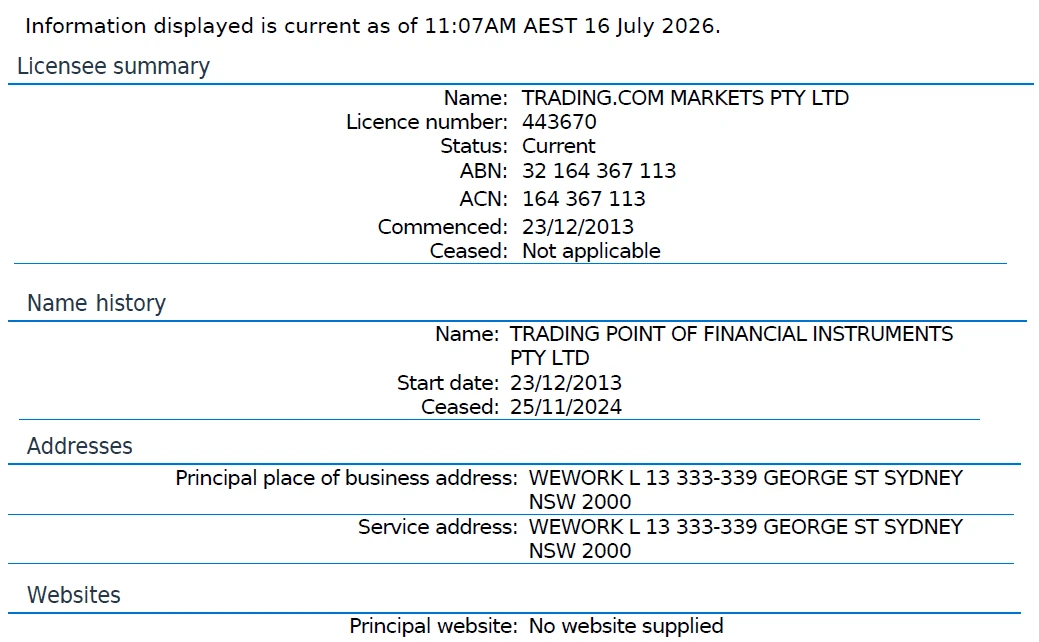
Beyond Australia, Trading Point Group entities hold FCA authorisation in the UK under FRN 705428, a CySEC licence in the EU under CIF 256/14, and CFTC and NFA registration in the US under NFA 0516820, but your account stays under ASIC rules.
The licence obliges the broker to hold client funds in segregated accounts at an Approved Australian Bank, provide negative balance protection to retail clients, apply margin close-out at 50% of the initial margin, apply the ASIC retail leverage caps, and maintain AFCA membership for retail dispute resolution, and those protections apply to your account automatically.
Before depositing, confirm Trading.com holds AFSL 443670 using the site's guide to checking a broker on ASIC's register.
Trading.com ownership: Trading Point Group, not StoneX
Trading.com is a consumer brand operated by entities within the Trading Point Group, the same group behind XM, and it is not part of StoneX or GAIN Capital; it’s worth being clear on that because the naming leads people astray.
The confusion is worth clearing up because the naming invites it: StoneX owns Forex.com, a separate broker with its own Australian licence and its own review on this site, and no ownership link runs between the two brands at all, so if you land here thinking it is Forex.com, I would call that the wrong place.
In Australia the brand operates through Trading.com Markets Pty Ltd under AFSL 443670. The group’s other licences sit with sibling entities rather than with the Australian one, so an Australian retail account is governed by the ASIC rules alone, meaning your protections are local, not imported.
The brand is newer and smaller than CMC Markets, IG Markets, Pepperstone or IC Markets. That is not a black mark, and it does mean less public track record to lean on, which is what holds the trust rating below the tier-1 names; we weigh that in our trust score.
Trading.com client money protection and AFCA membership
Your money sits in segregated accounts at an Approved Australian Bank, with AFCA membership under member ID 33339 hearing claims up to A$1,263,000.
Client money accounts sit separate from company funds. ASIC requires negative balance protection on retail CFD accounts, so a retail account cannot lose more than the money in it. AFCA awards compensation up to A$631,500, and the Compensation Scheme of Last Resort pays at most A$150,000 for personal advice, securities dealing and credit only, so I would not treat it as any help for forex or CFD trading.
The published member ID is worth noting: most brokers in this coverage name AFCA without giving the number, and this one publishes it in both the Client Agreement and the PDS, which makes lodging a complaint a shorter process, and that transparency is a genuine help.
The retail licence protections are otherwise identical to those at every other holder in this coverage, because the regime sets them rather than the broker. The field comparison sits in the brokers rated safest, and the mechanism in the guide to negative balance limits for retail traders, but a trader would not pick this broker for safety alone; in my view there are stronger options.
Public reviews
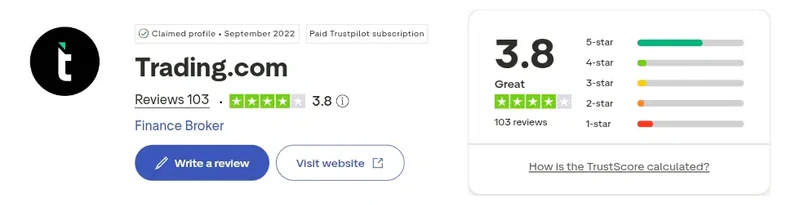
Trading.com holds a Trustpilot rating of 3.8 out of 5 from 103 reviews, which Trustpilot labels great, captured September 2026. The profile has been claimed by the broker since September 2022.
How popular is trading.com in Australia?
trading.com is searched too rarely in Australia for month-on-month change to be meaningful: 110 branded searches in August 2026, 30th of 32. Search interest measures attention, not quality; the score above is the review verdict.
- 110
- Brand searches, August 2026
- n/a below 1,000
- vs July 2026
- 10
- Login searches
- 0.1%
- Share of all broker searches
Source: Google search volume, Australia, August 2026. How this is measured
What other review sites say
Trading.com's iOS app rates 4.73 out of 5 from 30 ratings on the Australian App Store (September 2026), listed as Trading.com: Your Markets App.
The rating comparison above renders only the figures held against a capture. Third-party coverage of this brand is lighter than the tier-1 names on this site, and Australian-specific commentary is limited, which cuts both ways; there is no deep pool of independent reviews to point a trader to, and I would not lean too heavily on public commentary here.
Trading.com at a glance: 17 key facts
Trading.com lists among its key facts ASIC AFSL 443670, current since 23 December 2013, and a single account that opens from a A$50 minimum deposit.
The licence holder is Trading.com Markets Pty Ltd. Its 17 key facts in the table below cover the entity, the platform pair and the fee schedule; I would start with those for the short version.
| Item | Detail |
|---|---|
| Australian regulator | ASIC, AFSL 443670, current since 23 December 2013 |
| Australian entity | Trading.com Markets Pty Ltd |
| Parent group | Trading Point Group, the same group behind XM |
| Not affiliated with | StoneX or GAIN Capital, the owners of Forex.com |
| Other regulators | Trading Point Group entities hold FCA (UK, FRN 705428), CySEC (EU, CIF 256/14) and CFTC/NFA (US, NFA 0516820) licences |
| Headquarters (AU) | Level 13, 333 George Street, Sydney NSW 2000 |
| Trading platforms | MetaTrader 5, Trading.com WebTrader, Trading.com app, MT5 mobile |
| Account types | Trading Account (spread-only, zero commission), Demo |
| Minimum deposit | A$50 |
| Base currencies | AUD and USD |
| Maximum retail leverage | 30:1 (forex majors), ASIC-capped |
| Spreads (EUR/USD) | 0.8 pips advertised, spread-only; 1.25 pips measured, 1.92 pips across eight pairs (22 to 24 September 2026) |
| Commission | None on any account |
| Funding methods (AU) | Cards, bank wire, Google Pay, Apple Pay (Trading.com AU help centre, 21 September 2026); card, Google Pay and wire on the portal menu captured 9 September 2026 |
| Inactivity fee | US$15 one-off after 12 months, then US$10 or A$10 monthly |
| Negative balance protection | Yes (mandatory under ASIC) |
| AFCA member | Yes, member ID 33339 |
| Demo account | Free, covers both platforms |
| Customer support | 24/7 live chat, phone, email |
The spread row carries both figures: 0.8 pips advertised and 1.25 pips measured on EUR/USD in our September 2026 capture, 22 to 24 September 2026. I would still treat the advertised figure as a claim rather than a measured average, and the measured one is the check on it.
Trading.com Trading Account spreads and fees
The Trading.com Trading Account prices spread-only at zero commission, advertised from 0.8 pips on EUR/USD and widening modestly into the Asian session, so you pay the spread and nothing else.
Trading.com was not in the May to June 2026 run, but our September 2026 capture, 48 hours from 2pm AEST on 22 September to 2pm AEST on 24 September 2026 on a London VPS, measured the Trading Account at 1.25 pips on EUR/USD and 1.92 pips across eight pairs, on a spread-only account with no commission. That measured figure is what you would have paid in that window, and it sits well above the 0.8 pip advertised from-rate, so I do not treat the advertised rate as a benchmark for the live cost.
| Pair | Trading.com (advertised from) | AU industry avg (Standard) |
|---|---|---|
| EUR/USD | 0.8 pips | 1.1 pips |
Advertised pricing here sits wider than Pepperstone Razor, IC Markets Raw and CMC Markets FX Active once commission is factored in. Our September 2026 capture measured the Trading Account at 1.25 pips on EUR/USD against AvaTrade’s 0.86 and Forex.com’s 0.82, and 1.92 pips across eight pairs, last of the eight standard accounts in that capture. Neither a raw nor a commission-based tier is offered at any volume, so your cost stays the same no matter how much is traded, and I would call that a simplicity benefit, though it caps the ceiling.
Other fees AU traders should check
- Overnight financing applies to positions held past 5 PM New York time, direction-dependent.
- Currency conversion applies to any instrument denominated outside the account base currency.
- Withdrawal fees run A$0 on most methods.
- The inactivity fee applies a one-off US$15 maintenance charge after 12 months without trading, then US$10 or A$10 per month while the account stays dormant.
What it costs to trade with Trading.com
Trading one standard lot of EUR/USD costs the spread with nothing added, advertised at 0.8 pips and measured at 1.25 in our September 2026 capture, and for me that is one less number to track.
| Account | EUR/USD all-in (pips) | Commission, round turn |
|---|---|---|
| Trading.com Trading Account | 0.8 advertised, 1.25 measured (September 2026) | None |
| Pepperstone Razor | 0.55 | A$7.00 |
| IC Markets Raw | 0.6 | A$9.00 |
| Forex.com RAW Pricing | 0.7 to 0.9 | A$7.00 |
| CMC FX Active | 1.0 | Included |
The single-tier model is the structural fact to work from: a trader whose volume grows has no cheaper account to graduate to here, where every raw-account broker in this coverage offers exactly that path, so if your lot sizes increase, the ceiling will be felt, and I would keep it in view. The comparison across pricing shapes sits in the lowest spreads guide.
The simplicity is a genuine benefit for a beginner: one number covers the whole cost of a trade, with no commission line, no per-lot arithmetic and no tier thresholds to track, which is worth something to a trader placing a few positions a month, and it removes mental overhead that a beginner shouldn’t underestimate.
Trading.com funding methods and withdrawal times
Trading.com requires a A$50 minimum across its funding methods and caps them at A$10,000 on all but bank wire, which is quoted at one to five business days.
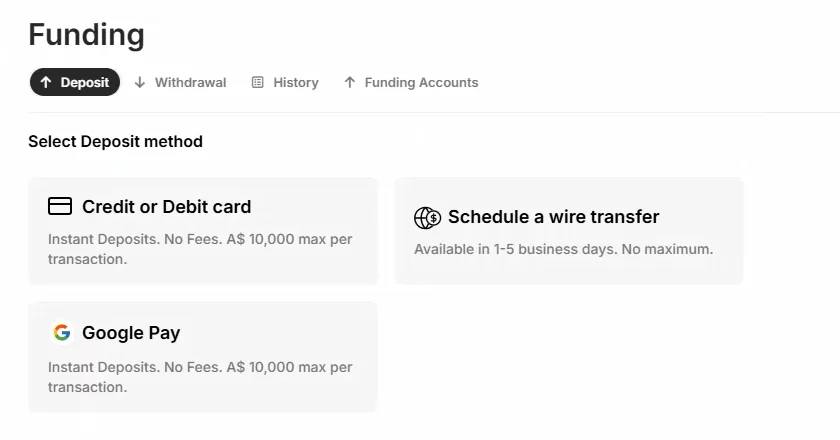
Three tiles were on the deposit menu Noam captured on 9 September 2026: card and Google Pay, each labelled no fees with a A$10,000 cap per transaction, and a scheduled wire transfer with no maximum. Those limits come from Trading.com’s help centre, so the cap on the tiles is the broker’s general one. You pay no deposit fee on either card-style rail, which keeps funding cheap.
Deposit methods (AU clients)
| Method | Fee | Speed |
|---|---|---|
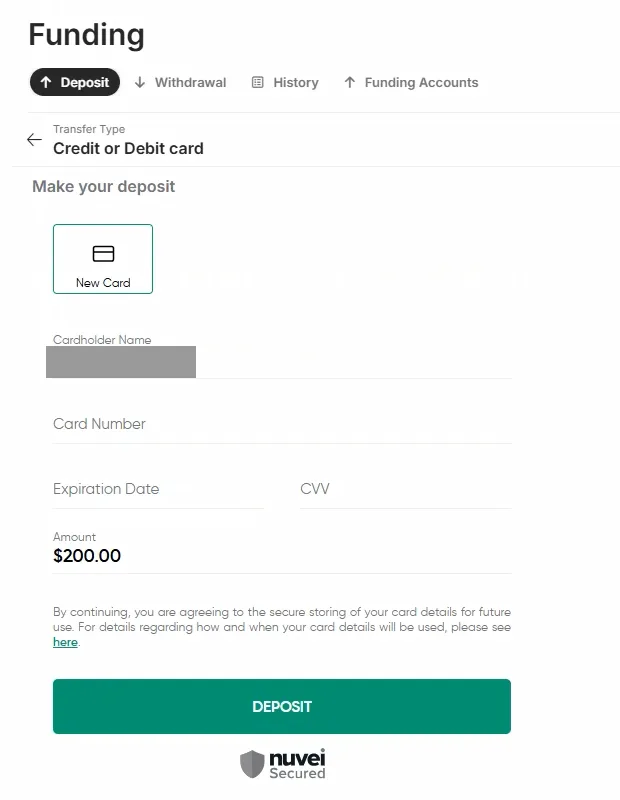
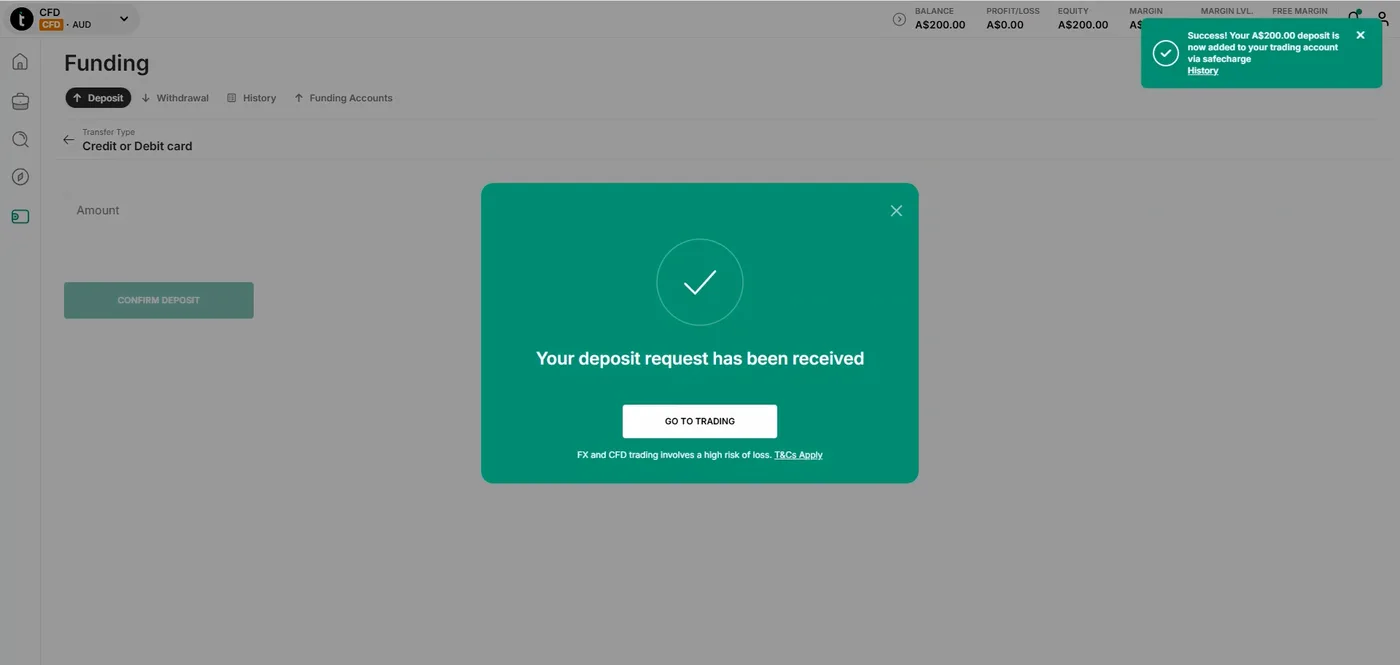
| Credit or debit card | A$0 (“No Fees” on the tile, 9 September 2026); A$50 minimum and A$10,000 maximum per transaction (Trading.com AU help centre, 21 September 2026) | “Instant Deposits” (tile label); our A$200 deposit showed in the balance in the same session |
| Google Pay | A$0 (“No Fees” on the tile); A$50 minimum and A$10,000 maximum per transaction | ”Instant Deposits” (tile label) |
| Bank wire | Not stated on the tile; A$50 minimum, no maximum (help centre) | 1 to 5 business days (tile) |
| Apple Pay | Listed by Trading.com (AU help centre, 21 September 2026); not on the menu captured 9 September 2026 | Not captured |
Trading.com’s own AU help centre (21 September 2026) lists cards, bank wires, Google Pay and Apple Pay. Apple Pay was not on the menu Noam captured, and no local bank rail without a card network appears on either list, so if you want one, look elsewhere. The card and Google Pay rails carry the same no-fee label and the same cap. For a first deposit I would use the card rail, because it credited in the same session in our test.
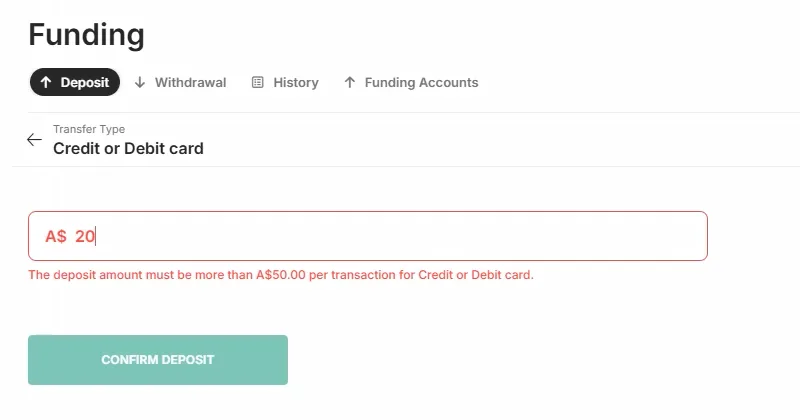
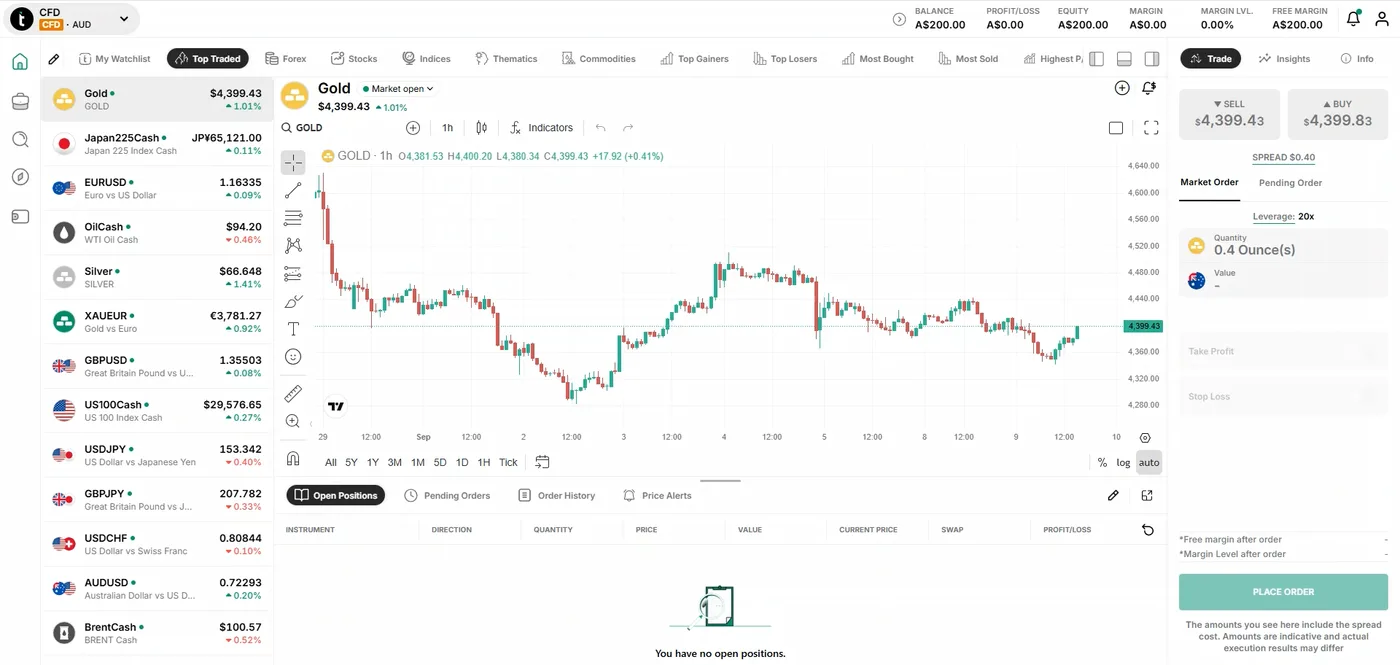
Noam Korbl ran our funding test on 9 September 2026 from the deposit menu captured that day, which showed three tiles: Credit or Debit card, a scheduled wire transfer, and Google Pay, the two rails labelled “Instant Deposits. No Fees. A$ 10,000 max per transaction.” He typed A$20 on the card rail and the form refused it, verbatim: “The deposit amount must be more than A$50.00 per transaction for Credit or Debit card.” His A$200 card deposit went through the Nuvei-secured form, and the balance and equity both read A$200.00 in the same session, with the confirmation toast and received-request modal shown. I like that the platform enforces its own minimum in the form rather than leaving you to guess it.
Withdrawals
The withdrawal fee runs A$0 on most methods, and withdrawals must return by the same source as the deposit where possible under AUSTRAC anti-money-laundering rules.
Account opening
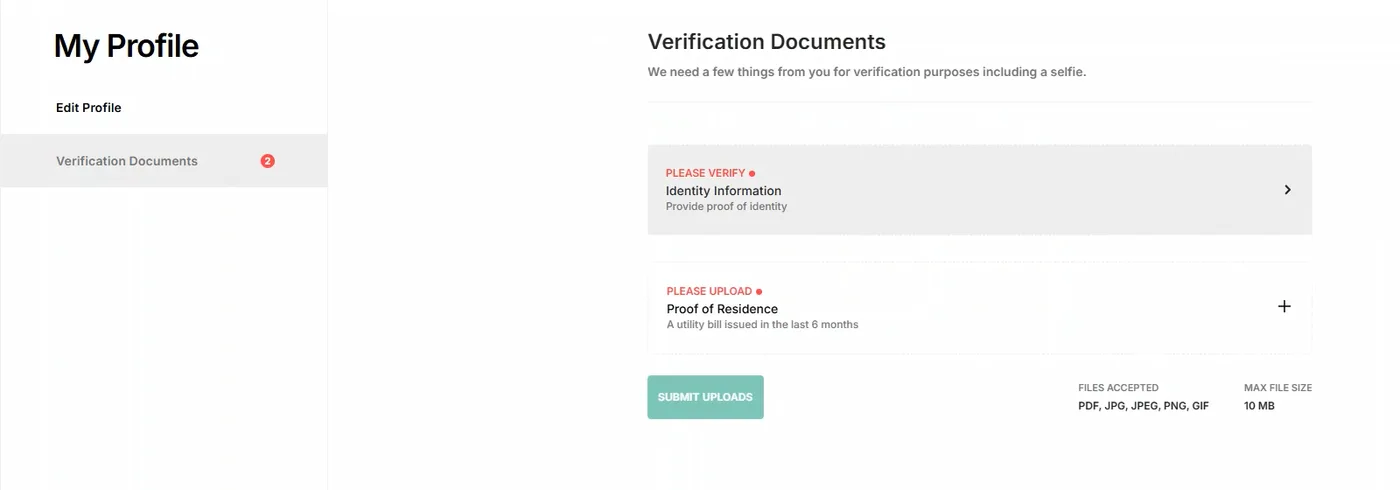
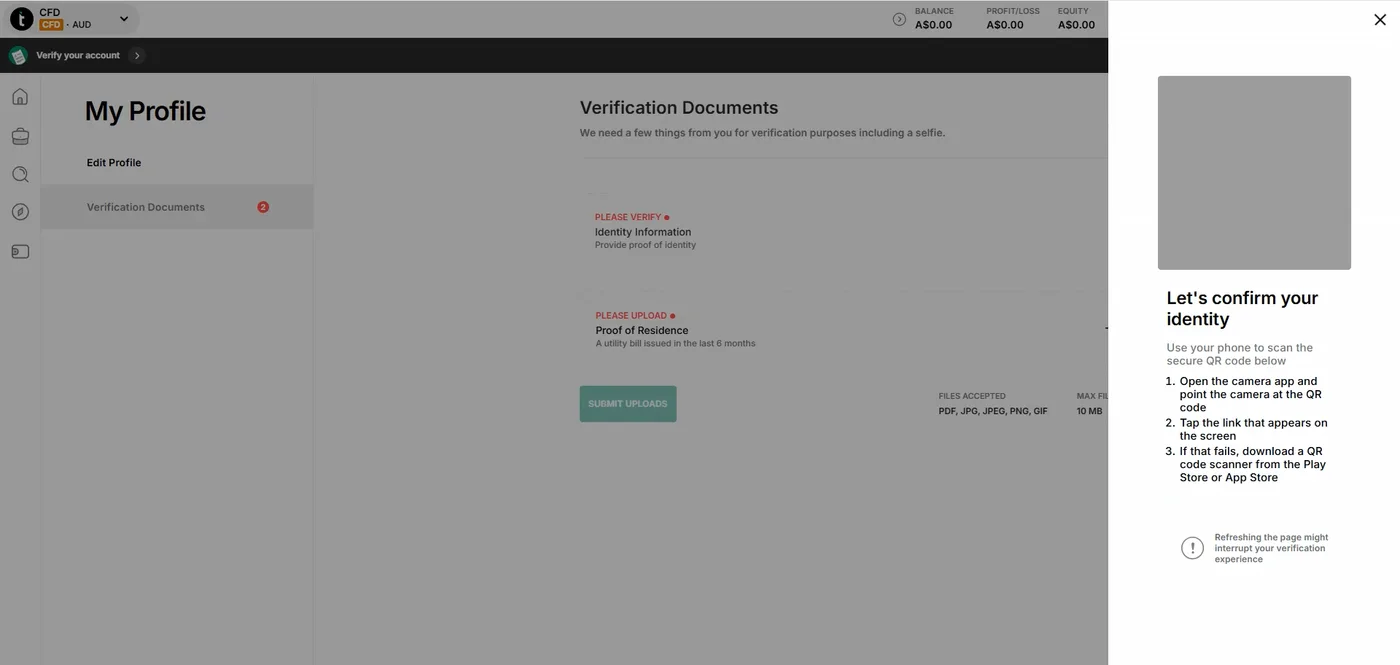
Trading.com opens accounts under Trading.com Markets Pty Ltd, the ASIC licensee holding AFSL 443670, and the application runs as a set of modals over a practice account that opens as soon as your email is confirmed. Identity and residence are checked on a photo document with a selfie and a utility bill, handed to your phone by QR code. Noam Korbl’s application frames date from 1 September 2026 and his verified, funded frames from 9 September. No frame stamps the approval, so no time is stated.
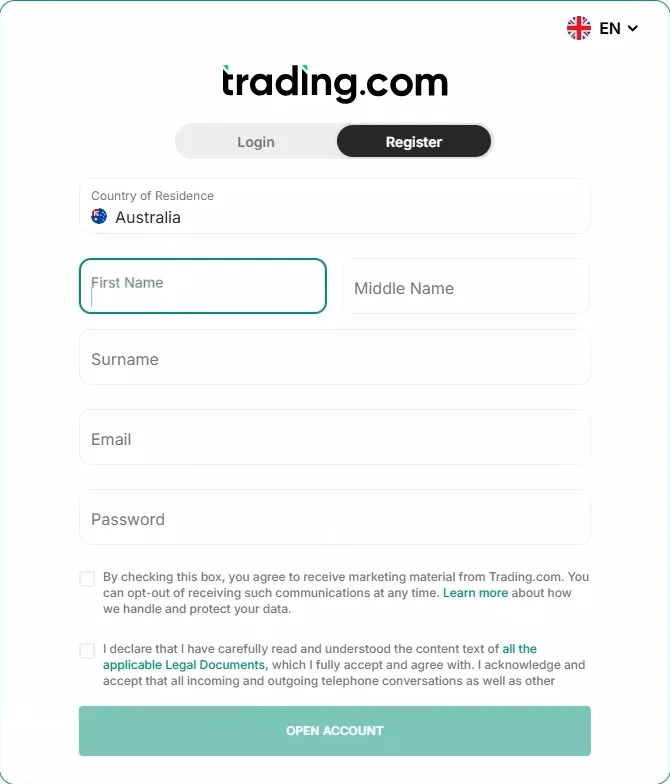
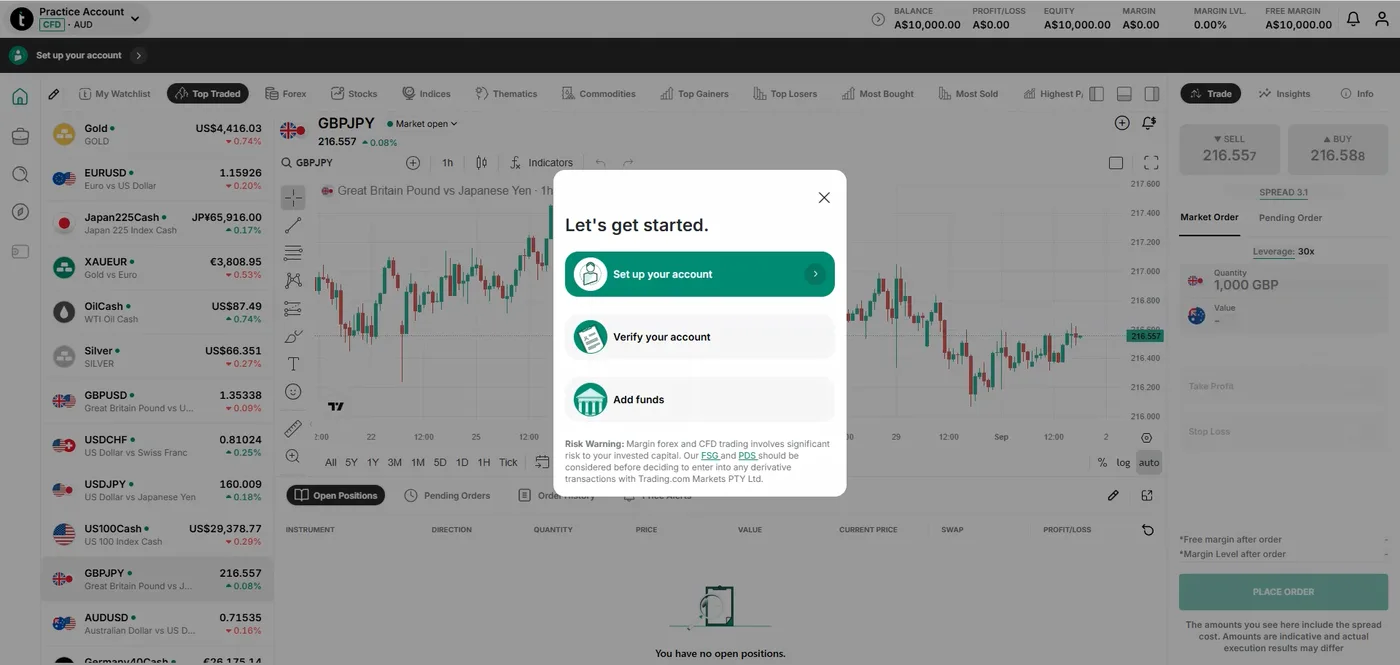
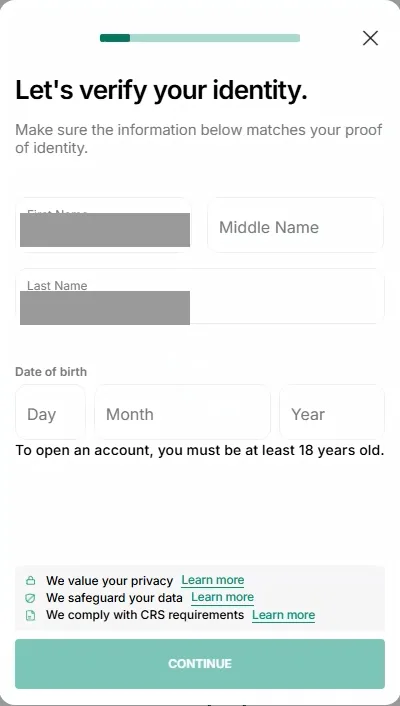
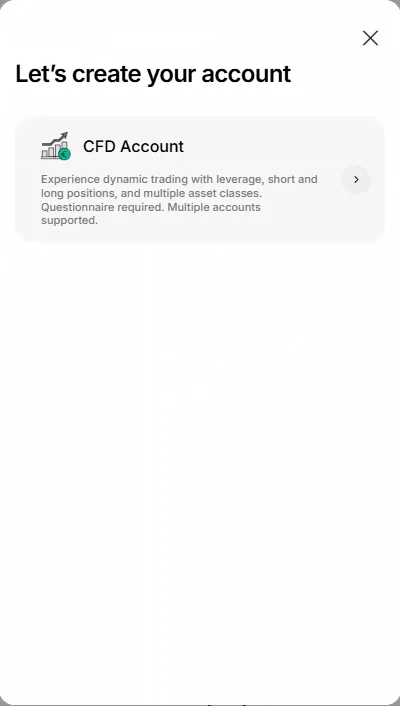
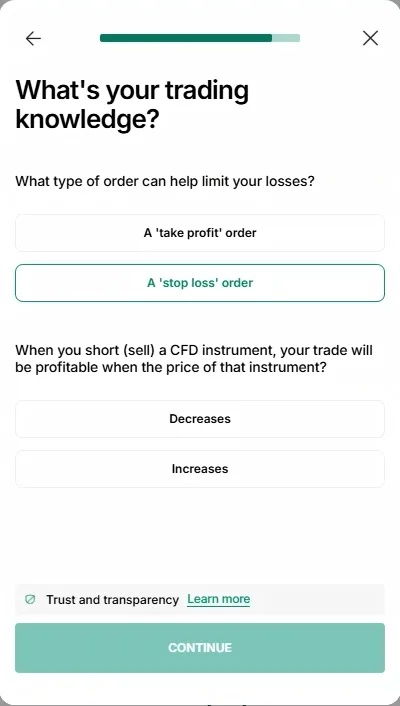
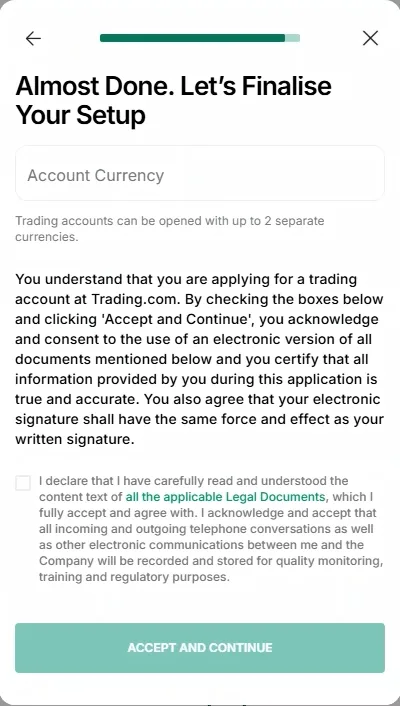
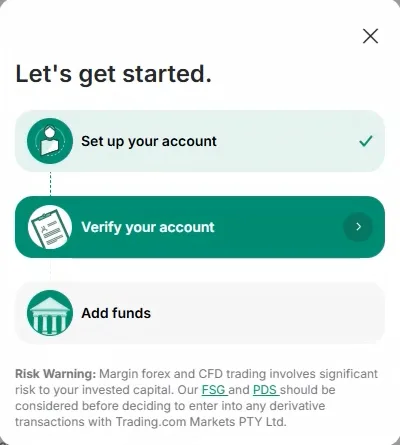
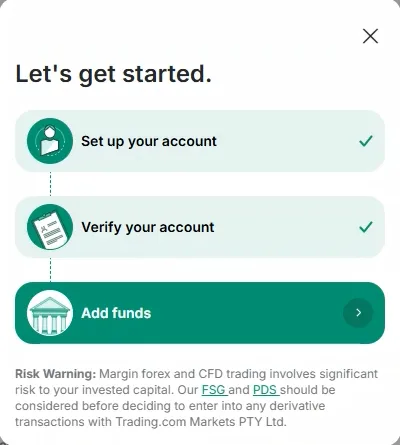
Registration opens with Australia preselected, then your name, email and password, a marketing box and a declaration accepting the Legal Documents and the recording of communications. Your confirmed email opens a Practice Account in CFDs and AUD with A$10,000.00 and a three-step checklist: set up your account, verify your account, add funds. You then enter identity details, nationality and place of birth, the US tax question, employment and nature of business, where your funds are located, your planned yearly deposit and the hardship question. A phone check follows, by automated call or text with a robot check and a six-digit code. A single CFD Account card appears, noting the questionnaire, then the purpose question and knowledge questions such as the stop-loss and short-CFD ones. You choose your currency, up to two, accept the legal declaration and confirm with your password.
After setup, the checklist ticked “Set up your account” and moved to “Verify your account”. The Verification Documents page read, verbatim: “Your account is being verified. We don’t need any documents from you at the moment.” Trading.com then emailed “Next Step: Verify Your Account”, requiring identity and residency documents, with an UPLOAD DOCUMENTS button. After the email link, the same page asked for proof of identity with a selfie and a utility bill from the last 6 months, files up to 10 MB. A QR code then handed the check to Noam’s phone. Nothing after that handoff is captured, so the document used, the selfie step and the clearing time are not established; the next frame is the verified checklist. Noam’s note: the confusing part was being told no documents were needed, then required by email, because you must leave the application for your inbox and re-enter verification, though once it starts the method is straightforward.
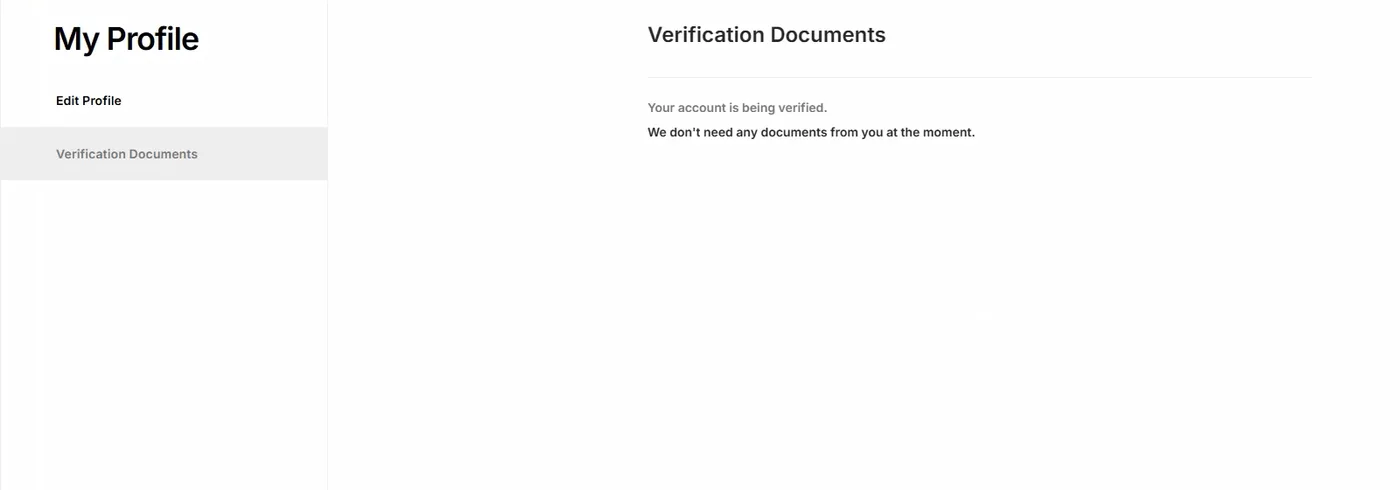
In his notes, Noam found registration straightforward, the profile and knowledge checks in the expected order, and funding one of the easier parts of the whole run; the hand-off was the main weakness in his view. I agree with him there, and telling a new applicant that no documents are needed before asking for them by email is a poor first impression from an ASIC licensee. From the verified checklist, the funded account is where you meet what Trading.com lets you trade.
Trading.com account types and minimum deposit
Trading.com offers a single account type, the spread-only Trading Account, at zero commission on a A$50 minimum deposit.
A free demo sits alongside it. If you want multiple account tiers, this is not the broker, and no additional tiers are on the roadmap.
| Account | Pricing model | Min deposit | Best for |
|---|---|---|---|
| Trading Account | Spread-only, zero commission | A$50 | All retail traders |
| Demo | Not applicable | Not applicable | Practice and platform testing |
The single-account model is the structural fact to work from: no cheaper tier exists to graduate to as volume grows, so your costs are fixed no matter how much is traded, and I would call that a structural ceiling. Base currencies cover Australian and US dollars.
No professional or wholesale tier exists here either, confirmed with the desk in July 2026. Trading.com Markets Pty Ltd holds the account throughout, so no offshore route to higher leverage exists and equally no way past the retail caps for anyone who came looking for one; anyone needing higher leverage will have to look elsewhere.
Trading.com offers no swap-free account, also confirmed with the desk in July 2026, so a Sharia-compliant requirement cannot be served here; if that is a requirement, this broker is off the table and I would say so outright.
Minimum deposit
The A$50 minimum is among the lowest on the ASIC-regulated shortlist and a practical amount for live platform testing before scaling in. The demo account covers both MT5 and the WebTrader, so the platform pair can be tested before funding. Use the demo to see if the WebTrader suits you, and I would test the WebTrader first.
Trading.com trading platforms
Trading.com offers two trading platforms, MetaTrader 5 and the proprietary WebTrader.
The Trading.com app and MT5 mobile cover phones and tablets, while MT4 and cTrader are absent. For MT4 EAs, this broker is not for you, and I would rule it out only on that requirement.
Trading.com WebTrader
The WebTrader is the proprietary browser-based platform, carrying TradingView charts embedded. It runs without a download, which suits a locked-down office machine, and covers the core order types and watchlist tools most retail traders need; it’s functional rather than flashy.
MetaTrader 5
The MT5 build adds native support for indices, share CFDs and futures alongside forex, with a deeper built-in economic calendar and an upgraded strategy tester. I would put share CFD traders on it specifically, because that is where the equity range trades. If you trade shares, this is the platform here.
Mobile and copy trading
The Trading.com app and MT5 mobile both run on iOS and Android with biometric login. No dedicated copy trading product exists, so the MetaTrader Signals marketplace is the only route, and a trader shopping mainly to follow others is choosing a broker from the copy trading comparison instead; if copy trading is the main reason for opening an account, I would point that trader elsewhere.
Trading.com markets and instrument counts
Trading.com offers four asset classes, and its markets and instrument counts are narrower than the multi-asset CFD specialists, comparable to the mid-tier brokers alongside it.
For traders who operate across many asset types, the ceiling arrives quickly, and I see that as the main limitation.
| Asset class | Count | Note |
|---|---|---|
| Forex | Majors, minors and exotics | AUD crosses: AUD/USD, AUD/JPY, AUD/NZD |
| Indices | Major global indices | ASX 200, S&P 500, NASDAQ, FTSE, DAX, Nikkei |
| Commodities | Metals and energy, plus a smaller softs set | Gold (XAU/USD), silver, WTI and Brent crude |
| Share CFDs | Selective | Traded on MT5, CFD only |
| Cryptocurrencies | None | Not available to Australian clients |
The class range here stops at four against 12,000 plus instruments at CMC Markets and 18,000 plus at IG Markets, and the CFD market comparison covers where each sits. The crypto row is the one absent outright: cryptocurrency CFDs are unavailable to Australian clients at all, so digital assets rule this broker out rather than count against it on price; if crypto is part of your strategy, the broker is unusable and I would rule it out on that ground.
Index coverage spans the ASX 200 alongside the S&P 500, NASDAQ, FTSE, DAX and Nikkei, and the commodity range is built around gold as XAU/USD, silver and the two crude contracts. A strategy needing a deep treasuries and bonds book is served far better at CMC Markets or IG Markets, so those are the brokers to use if treasuries matter.
Share CFDs
The share CFD range is selective rather than deep, and the cons name that against the multi-asset specialists. No ASX ownership route exists here, because every equity position is a CFD traded through MT5, so anyone wanting to hold real ASX shares needs a different broker, and CMC Markets is the obvious swap; if you want to own the underlying, this is not the place. The class is compared in share CFD basics and brokers.
Trading.com leverage and margin under ASIC rules
Trading.com leverage in Australia caps at 30:1 on major forex pairs under ASIC rules, with no professional tier above the retail caps, so higher ratios are not available on this licence.
ASIC caps retail CFD leverage at 30:1 on major forex pairs, 20:1 on minor pairs, gold and major indices, 10:1 on commodities other than gold, 5:1 on share CFDs and 2:1 on crypto assets. The caps come from a product intervention order extended to 23 May 2027, so your leverage here is the same as at any other ASIC-regulated broker, and the caps apply at every ASIC broker rather than at this one alone.
For Australian clients, the crypto cap is moot, because crypto CFDs are not offered here at all under the current product list; you cannot trade crypto here and I would treat that as a hard exclusion.
The retail margin rule requires every CFD issuer to close a retail client’s positions once account equity falls below half the total initial margin on all open positions. The margin mechanics are set out in understanding margin leverage, and the comparison of high-leverage brokers for professionals covers the brokers that publish a wholesale route, which this one does not; if you need higher leverage, another broker is the answer, and I would not treat this broker as a high-leverage option.
Trading.com customer support
Trading.com customer support runs 24 hours a day, seven days a week on live chat, phone and email, including weekend cover that matters because margin questions don’t wait for Monday.
The round-the-clock hours are the notable part. Several larger brokers in this coverage close their desks from Friday evening to Monday morning, and a client holding a leveraged position across the Sunday open reaches a person here, which could matter if you trade around the open.
That margin question matters most in exactly that window, because it cannot wait two days for an answer. Weekend cover on a mid-tier broker is unusual enough to count as a genuine differentiator, and we give it weight in the service score.
The service stack runs to three channels including a phone line, which is the full set most of this field carries. No response time figure has been measured on this broker, so none appears here and we cannot speak to response times; the service rating reflects the desk size rather than the hours. The channel range is the same set most Australian brokers carry, so the differentiator here is the weekend cover rather than the routes into the desk, and the weekend availability is a plus.
Trading.com research, tools and education
Trading.com research, tools and education run to four components, functional rather than exceptional against the larger Australian brokers, and they will feel thin if you rely on broker research.
The research stack covers an integrated economic calendar inside MT5, daily or weekly market commentary, the standard MetaTrader tutorial library and a glossary of trading terms, though most of that comes from MetaQuotes rather than the broker.
Four research components is thin against the seven or more at the larger houses, and three of the four arrive from MetaQuotes rather than from the broker, so the research offering is bare-bones. The market commentary is the only piece written in-house.
The practical consequence falls on newer traders. A trader who already knows MT5 loses nothing here, and a trader still learning position sizing or risk gets more from Pepperstone Insights or the CMC Markets library; if you are learning, look elsewhere for education. The licence context those guides would cover is set out in the leverage education page. The research stack carries no proprietary analysis desk and no webinar programme, which is the gap between a functional library and a reason to open an account.
What traders say about trading.com
| Rating site | Rating | Based on | Who rated | Captured |
|---|---|---|---|---|
| Trustpilot | 3.8 out of 5 | 103 reviews | Worldwide | September 2026 |
| App Store | 4.73 out of 5 | 30 ratings | Australia only | September 2026 |
Each row above is a public rating of trading.com taken from a rating site, dated to the month its figure was captured. An App Store rating counts ratings left on Apple's Australian App Store only, while a Trustpilot figure counts reviews and a TradingView figure counts ratings from anywhere in the world. A site with no row has no rating for trading.com, withholds it, cannot be matched to trading.com with confidence, or we have not captured it yet.
How Trading.com compares to Forex.com and AvaTrade
Trading.com advertises 0.8 pips on EUR/USD and lists four asset classes, so the comparison with Forex.com and AvaTrade is a simplicity win against a range and pricing loss.
Forex.com RAW Pricing runs 0.7 to 0.9 pips all-in, and Forex.com lists six asset classes. Trading.com is simpler, but narrower.
All three are mid-tier, multi-platform, ASIC-regulated CFD brokers in the same competitive bracket. Forex.com brings a NASDAQ-listed parent, four platform routes and treasuries, while AvaTrade brings a proprietary platform and a wider product set; Trading.com’s edge is the single-account simplicity and weekend support.
What Trading.com holds against both is the single-account simplicity, the A$50 minimum and 24/7 support including the weekend; if you value those, it’s worth a look.
Put trading.com next to any of the other 31 ASIC-regulated brokers we cover.
trading.com Totality Middle of the measured field
Neither trading.com nor Totality carries a figure on the raw eight-pair basket, no measured 8-pair raw average.
Neither trading.com nor Totality carries a figure on raw EUR/USD, no single-pair EUR/USD figure on record.
trading.com quotes 1.25 pips on standard EUR/USD; Totality carries no figure, no typical standard-account EUR/USD figure.
Neither trading.com nor Totality carries a figure on round-turn commission, no per-lot commission on record.
Neither trading.com nor Totality carries a figure on raw account cost at ten standard lots a month, no measured 8-pair raw average.
trading.com comes to A$178.32 on standard account cost at ten standard lots a month; Totality carries no figure, no typical standard-account EUR/USD figure.
trading.com's A$50 matches the middle broker's A$50; Totality's A$0 sits A$50 below it.
trading.com runs MT5; Totality runs Own platform.
trading.com holds AFSL 443670; Totality holds AFSL 280372.
trading.com's 70 / 100 sits 5 below the middle broker's 75; Totality's 69 / 100 sits 6 below it.
trading.com's 3.8 / 5 sits 0.5 below the middle broker's 4.3; Totality's 2.4 / 5 sits 1.9 below it.
trading.com's 4.73 / 5 and Totality's 1.49 / 5 straddle the middle broker's 4.54.
Neither trading.com nor Totality carries a figure on the TradingView broker rating, no TradingView broker profile.
trading.com's 110 and Totality's 2,570 straddle the middle broker's 1,350.
Capture: September 2026 · AUD/USD 0.7010 (25 Sept 2026) · field: the measured field varies by row, from 16 to 24 brokers, of 32 reviewed.
Bars run lowest to highest across the measured field; the tick marks the middle broker.
| If you value… | Consider |
|---|---|
| Tighter forex spreads | Pepperstone or IC Markets |
| Broader product range | CMC Markets, at 12,000 plus CFDs |
| Same mid-tier multi-platform profile | Forex.com or AvaTrade |
| A raw or commission tier | Fusion Markets or IC Markets |
| An Australian founding story | Pepperstone, Melbourne, 2010 |
| Beginner-focused experience | Plus500 or eToro |
Should you open a Trading.com account?
If you want one simple spread-only account on MT5 with a clean WebTrader, on a A$50 minimum deposit, Trading.com is a fit. The account fit breaks for traders filtering on cost or range, who are served better elsewhere than by a Trading.com account.
Two groups of trader gain clear value from a Trading.com account. The pricing model carries one number and no commission line, which suits a beginner placing a few positions a month; that simplicity is the concrete benefit for the beginner. The service stack runs 24/7 including the weekend, which several larger brokers in this coverage do not.
Two groups should look past a Trading.com account. The advertised 0.8 pips trails the raw cohort badly, with no commission tier to move to at any volume. The class range stops at four, and crypto CFDs are unavailable to Australian clients entirely. If cost or range is your filter, skip this one.
Trading.com ranks nineteenth among the highest-rated forex brokers in Australia on the 2026 scoring, held there by cost and range rather than by trust, where it rates well. A free demo account covers both platforms. Use that demo to see if the simplicity works for you.
FAQs
Is trading.com legitimate?
How do I withdraw money from trading.com?
Is Trading.com the same as Forex.com or XM?
What leverage does Trading.com offer in Australia?
What is the minimum deposit for trading.com?
Does Trading.com offer MT4 and MT5?
Does Trading.com charge an inactivity fee?
Is Trading.com a member of AFCA?
Testing log
| Record | Detail |
|---|---|
| Review published | 16 May 2026 |
| Last content change | 27 September 2026 |
| Spread capture | Standard account, 1.25 pips EUR/USD |
| Capture window | September 2026 |
| Verification | AU costs verified from the published site 6 July 2026; live CFD AUD account opened by Noam Korbl, application frames saved 1 September 2026, identity and residence verified by phone, funded by card with A$200 on 9 September 2026 |